Human control: the indicator, Pause and Stop
The person can always see that an agent is attached, can pause it or stop it at any moment, and wins when both use the page at once.
The indicator #
While an agent is attached the driver shows an indicator naming it, with Pause and Stop when the policy enables them. The open and guarded profiles have both buttons. The kiosk profile has Pause only: a visitor cannot revoke the station's assistant.
Under open and guarded the text of the indicator is a button. It opens a panel with three tabs: Permissions, where the person sets how much each agent asks, a rule for single actions and the scopes of the grant as switches; Activity, the last 50 commands; and Chat. The panel opens and closes on the person's input alone: no agent and no message can open it, close it or press anything in it. See Permission levels and Chat.
The indicator names each agent the way every part of the overlay does: the name in quotation marks, then its session id, as in AI connected: “Barista AI” (a1). A name therefore cannot pass for words of the page or finish one of its sentences, and two agents with one name are told apart.
What the person loosened stays in sight. While an agent's level is not ask, the indicator shows that level: a chip with its name, and a dot that is amber for auto and red for bypass. While a rule of the person waives a prompt, the indicator shows that too ("1 rule"), and an approval the page remembers is counted on the same chip ("1 approved"). New chat messages show as a count on the indicator; the panel never opens by itself.
The indicator, like the consent prompt, lives in a closed shadow root owned by the driver and acts on trusted input only: an event the browser made for input of the person and is delivering to the control it was meant for. Neither an agent nor synthetic events can press its buttons. Pause and Stop work without the hub's cooperation: the page enforces them itself.
This keeps agents out, and events that a script makes or borrows. It does not keep out script that runs in the page itself: see What script in the page can do below.
When the hub is unverified, because the page holds no surface key, the indicator says so.
Pause #
Pause holds every command that changes the page. While the person has paused control, every method outside the read-only ones fails with E_PAUSED. The read-only methods are observe, read, state.get, sub, unsub and chat.read: an agent can still see the page while it waits. chat.say and chat.status are served as well: a paused agent cannot act, and can still answer the person.
Pause also stops the cursor where it is and discards queued pointer points.
An agent that gets E_PAUSED should wait for the person. A subscribed agent gets evt user with kind: "pause" and kind: "resume". Pause holds every attached agent.
Stop #
Stop revokes the grant. The surface sends evt grant {kind:"revoked"} and the hub ends the grant: the agent's next request fails with E_NOT_ATTACHED.
After Stop, or a revocation after three refused prompts, every later attach on that page needs the person's approval until the page is reloaded, even where the policy says allow.
Checks hold across waits #
A command that waited, for a cursor glide, a consent prompt, or the person to stop typing, checks again, right before it acts, that the grant is live, its scope is still on, control is not paused, no consent prompt is up (except for the action just approved) and the indicator is usable. Stop or Pause pressed during a glide means the click never happens. An action that no prompt was shown for runs only if the person's level and rules still let it run without asking, and an action the person approved does not run once they have blocked it: the later word counts.
Real input wins #
Trusted pointer, key, wheel and touch input from the person holds input-synthesising commands. Every ui.* command waits until there has been no such input for human.yieldMs (800 ms under guarded), then runs, and fails with E_PAUSED if the person keeps using the page for 5 s. A pointer move counts only with a button down.
The first such input after a quiet period emits evt user {kind:"override"}, so a subscribed agent learns that the person took over.
This applies to synthetic input only. App actions (act), the cursor and what an agent shows are not held by the person's typing. Typing in the Chat tab counts as using the page, and while the app's own code runs because an agent asked for it (an action's handler, a view's renderer, a state getter, the handlers of synthesised input), the chat's field takes no input: what such code puts into a focused field was chosen by the agent.
The indicator has to stay visible and usable #
A modal dialog or a fullscreen element covers the rest of the page and makes it inert, so while one is open the driver moves its overlay inside it. The indicator also stays above a consent prompt's backdrop.
The overlay has a style of its own: its stylesheet reads no custom property, names no font family other than the generic ones and no system colour, and fetches nothing, so a page's stylesheet cannot recolour it, blank it or swap its letters, and both colour schemes are written out in it. The host element has no ::before, ::after or ::marker box that a page rule can bring back, and its ::backdrop does not show.
Where the browser has the Popover API, the overlay lives in the top layer and is shown again whenever another element enters the top layer after it, so that it is painted last: no z-index of the page lies above it, and a filter, an opacity or a transform on an ancestor does not reach it.
The driver checks all of this. The check fails while the host is not in the document, is inert or does not cover the viewport; while it is not last in the top layer; while a zoom on it or on an ancestor reaches it, top layer or not; while a style fades, filters, clips, masks, transforms or blends it; while the page renders nothing; while the indicator has no box or is not what a hit test finds at its own centre; and, where the browser can tell (Chromium), while the indicator, the open panel or the prompt that is showing is painted over.
Whenever the overlay cannot be shown where the person can see and use it, every method outside the read-only ones, and attach, fails with E_PAUSED, and no click that lets an agent do more is taken. A click that made the check put the overlay back on top is itself not taken: it was made on what the person saw then, and only a later, separate one counts. An agent never works where the person cannot see that it does.
Note
A page that puts zoom on html or body, for whatever reason, fails the check for as long as it does: Reins does not drive such a page at all.
No wait of the overlay relies on a timer firing. The arming delays, the lock after typing, the cool-off and the deadline of a prompt are times compared with the clock when a click, a key or a request arrives, because timer ids belong to the document and anything that shares the document can clear them. A timer that never fires may leave something on screen; it never leaves anything answerable or running that would not be so otherwise.
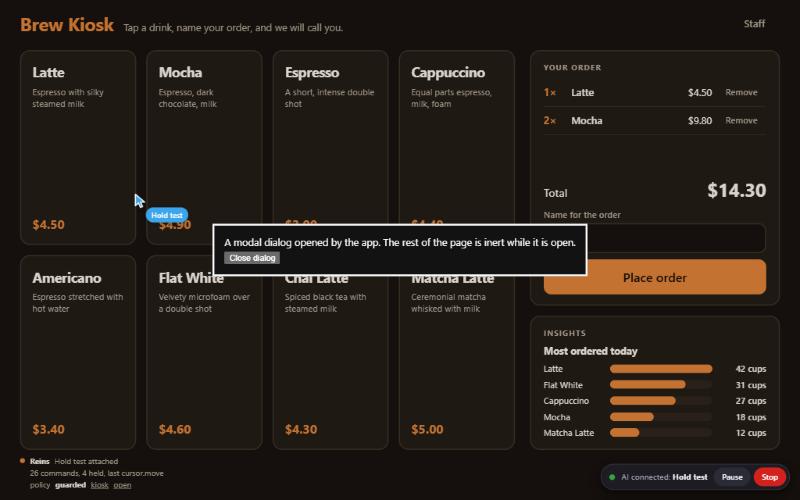
For the same reason the driver refuses to connect inside a frame: the page around a frame could cover the indicator. See Policy profiles.
What script in the page can do #
Warning
Script that runs in the page's own JavaScript realm can defeat the overlay, whatever the order in which it and the driver load. An XSS payload or a hostile third-party tag is such script. Loading the driver first does not prevent it.
What is closed is one family of attacks: events that a script forges, or borrows from a real click somewhere else, and hands to the overlay's listeners. The driver keeps the functions it registers listeners with from the moment its script first runs, reads isTrusted through the browser's own getter, and counts an event only while the browser is delivering it to the control the listener belongs to.
Nothing else about script in the page is closed. The driver is ordinary script in that realm: it keeps its prompts in an array and its sessions in a map, and sets attributes and reads properties through methods every script can replace. The second security review, from a script injected after the driver had attached, approved an attach and an action with no card on screen and no click (a replaced Array.prototype.push), put a session at Bypass with nothing shown and nothing told to the hub (a replaced Map.prototype.get), and reached the closed shadow root through Element.prototype.setAttribute. Such script can also draw its own copy of an indicator or a prompt, or simply call the app's functions.
So wherever this site says "trusted input only", "only the person" or "no agent can press it", script in the page's own realm is outside that claim. What must not happen is hostile script in the page: keep a strict Content Security Policy.
There is a boundary where the driver does not share a realm with the page. In an Electron app adopted with reins-electron the driver runs in an isolated world with built-ins of its own, and the page's script shares the document with it (elements, styles, timers) and none of its code or objects. What the page's script can still do there is what the page's stylesheet can do, plus three things: remove or move the host element, clear timers, and keep the person's clicks and keys from reaching the overlay at all, since a capturing listener on the window sees every event first. The first two stop commands or leave a prompt unanswered. The third takes Pause, Stop and Deny away from the person for as long as the script does it, while the indicator still shows. None of the three answers a prompt or raises a level.
The full text is "The overlay and the page" in section 12 of the specification, and "Script in the page's own JavaScript realm" under What Reins does not protect against.
What an agent writes is labelled #
Toasts are agent-written, so each one carries a caption naming the agent that sent it. Agent text is inserted as text, with invisible and look-alike characters shown as escapes.
From the app's own code #
The driver exposes the same controls to the app: driver.pause(), driver.resume() and driver.stop(). driver.status is controlled while an agent is attached and paused while the person has paused it.
Try it #
In the playground, press Pause while the assistant works and watch its next command come back E_PAUSED in the Wire tab. Press Stop and watch the evt grant cross.
Further reading #
- Consent
- Security requirements: rules 10 and 11.
- Specification, section 12